Desktop application
Spotlight Windows / PulseFind
A lightweight, keyboard-first Windows launcher that searches and opens Start Menu shortcuts.
Local Windows release build
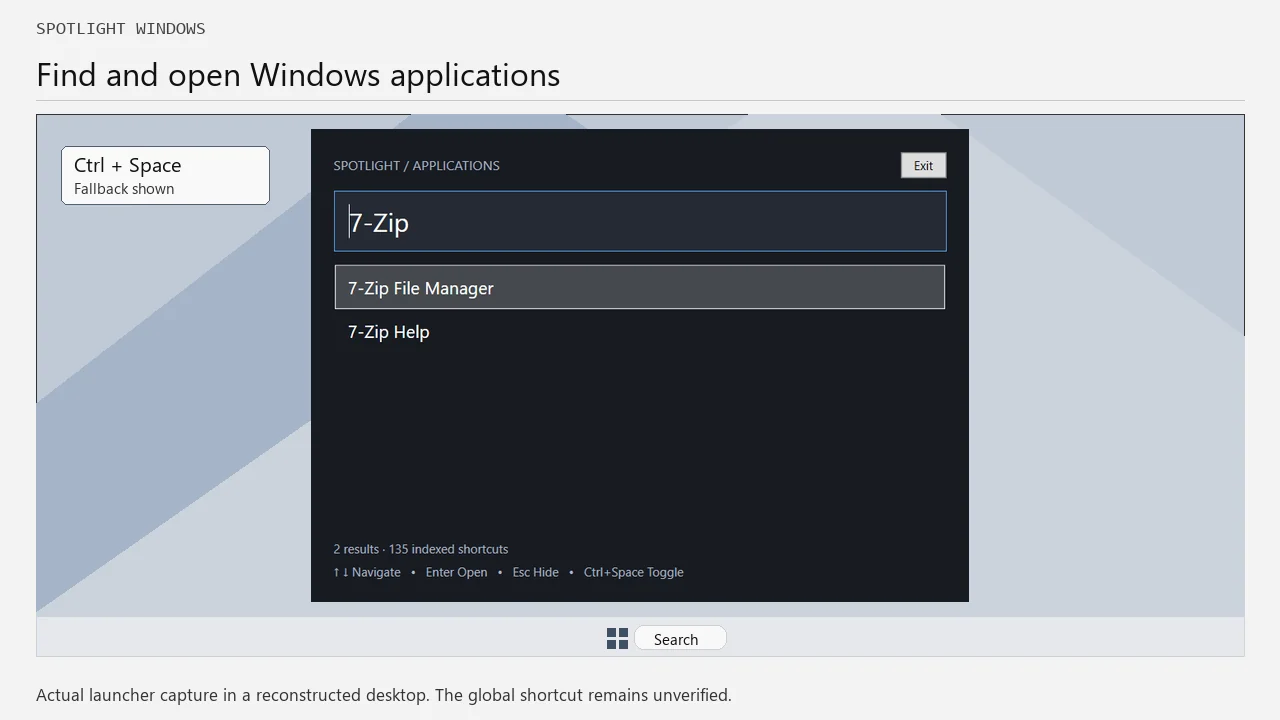
The published launcher runs locally. This recording uses the documented hotkey-conflict fallback.
Typing 7-Zip filters genuine Start Menu results, with keyboard-first selection.
The accepted desktop test verified a 7-Zip launch, keyboard navigation and Exit.
Problem statement
Opening a known application should be possible with a few keystrokes, without browsing folders or leaving the keyboard.
Engineering objectives
Catalog installed shortcuts, rank matches predictably and support a complete keyboard flow.
Architecture
Catalog reads user and common Start Menu shortcuts in the background. SearchViewModel manages query, results and status. Spotlight.Core provides platform-independent ranking. WPF owns native hotkey registration and shell launch.
- Start Menu shortcuts
- Background catalog
- Deterministic ranking
- WPF results + shell launch
Implementation
Ctrl+Space toggles the launcher. Arrow keys select results, Enter opens a selected shortcut, Escape hides the window and keyboard Exit closes it. A taskbar-accessible fallback handles hotkey conflicts.
Technical decisions
Rank ties resolve by name and path. Launching requires selecting a discovered shortcut. Catalog traversal skips inaccessible directories and reparse points.
Challenges and solutions
A shortcut conflict could leave keyboard users without a reliable route to open or exit the window. The fallback stays accessible and a focused Exit button keeps its Enter action.
Automated testing
Four Release tests cover ranking. Desktop validation exercised search focus, both arrow directions, explicit launch and keyboard Exit in the conflict fallback.
Verified results
- Release built with zero warnings and errors.
- Framework-dependent win-x64 publish completed locally.
Limitations
Ordinary global hotkey delivery, previous-window focus restoration, mixed DPI and deleted shortcuts remain foreground validation items. Indexing covers Start Menu shortcuts.
Future development
Run the remaining checklist on a foreground desktop at different display scales.
Repository information
- Repository
spotlight-windows- Validated commit
ba8f832- License
- MIT
- Source
- GitHub